This panel is visible only for Cloud Backup module subscribers.
Coro Cloud Backup enables Managed Service Providers (MSPs) to provide protection for their customers' cloud data against accidental deletion, ransomware, or malicious activity. It can also help compliance with local data retention regulations, satisfying stipulations that data is backed up securely off-site and retrievable in the event of loss or disruption.
The Cloud Backup dashboard panel shows a summary of backup and restore operations during the previous 30 days:
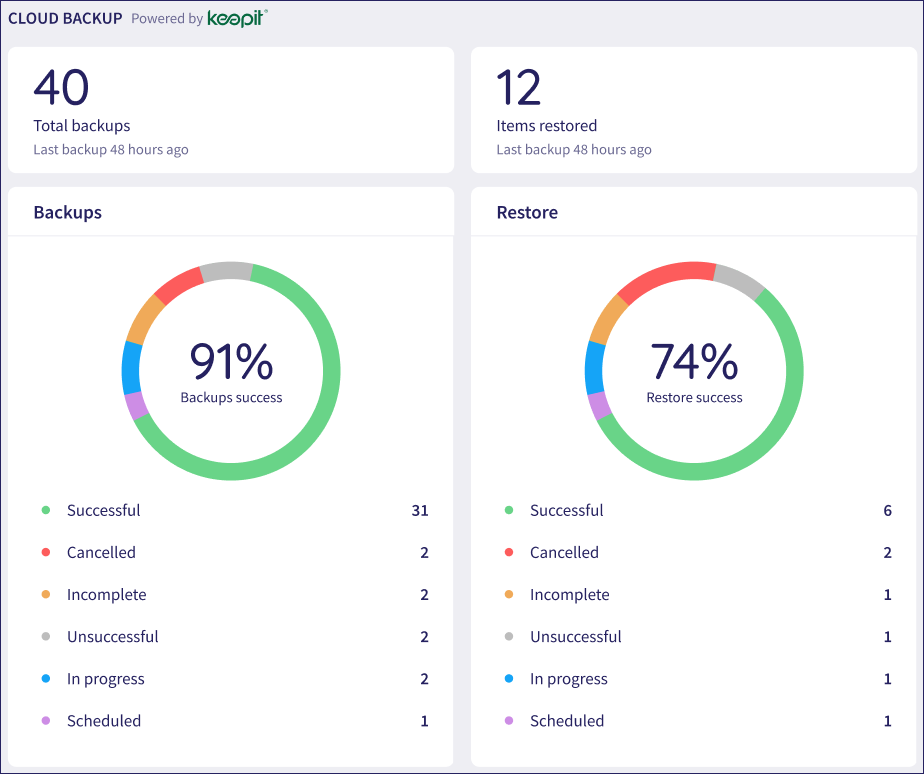
At the top, Coro shows the number of backup and restore tasks completed or scheduled.
The Backups panel shows a pie chart and percentage success indicator for backup tasks completed or scheduled. This is broken down as follows:
Successful: At least one or more items were successfully backed up and can be restored. Coro considers a scheduled backup task as successful even if no items have changed, or if some items were skipped (and marked as ready to be backed up at the next task).
Cancelled: The backup task was abandoned due to an interruption such as a software update or server reboot.
Incomplete: The backup task started, but was stopped due to an error. Coro may or may not have created an accessible partial backup in this instance, depending on the severity of the error.
Unsuccessful: The entire backup task failed.
In progress: The backup task is currently running.
Scheduled: The backup task is scheduled to start.
The Restore panel shows a pie chart and percentage success indicator for restore tasks completed or scheduled. This is broken down as follows:
Successful: The task successfully restored all items saved in the backup.
Cancelled: The restore task was cancelled from the Keepit console.
Incomplete: The task skipped restoring one or more items.
Unsuccessful: The entire restore task failed, or all items were skipped.
In progress: The restore task is currently running.
Scheduled: The restore task has been triggered and is scheduled to start.
See also: