This article discusses how to upgrade the Coro Agent software on your endpoint devices. You can check the current version for your endpoint devices through the Coro console.
To upgrade the Coro Agent, see the instructions for your device operating system:
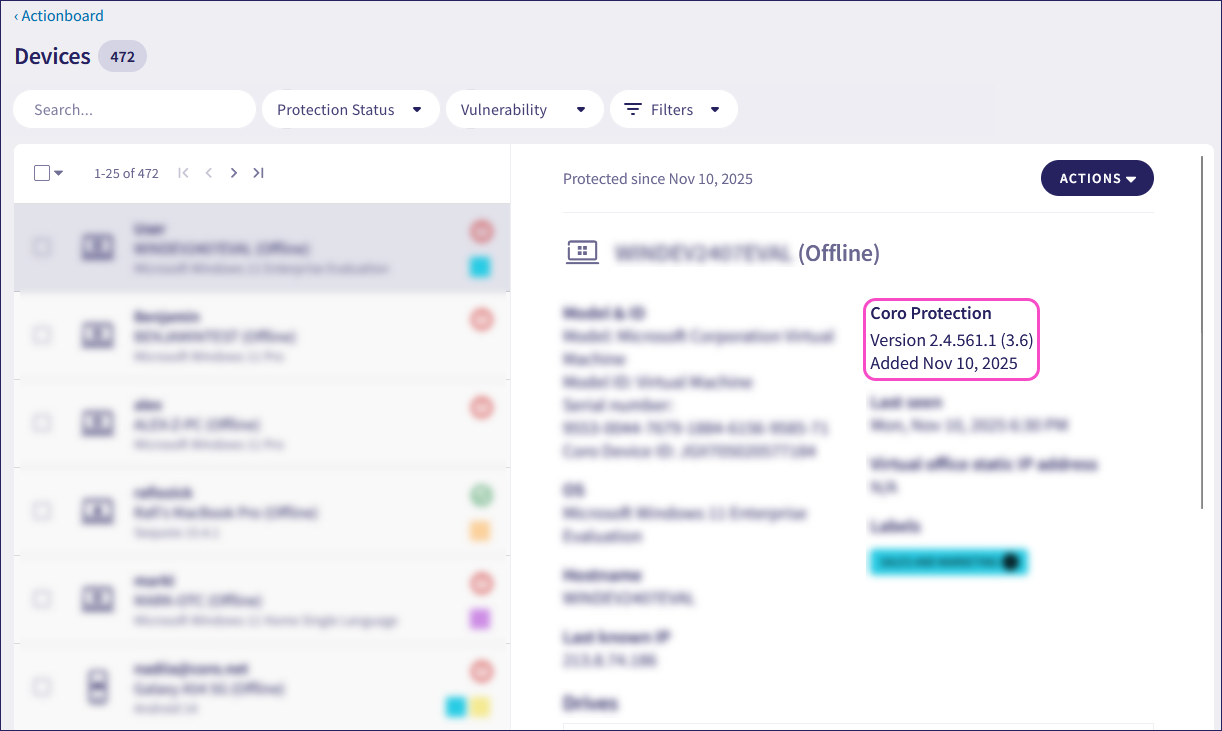
To view which Coro Agent version is installed on a specific endpoint device, use the Devices page:
From the Actionboard, select the Protected Devices panel:

Select an endpoint device from the devices list.
The Coro Agent version installed on the endpoint device is displayed under the Coro Protection section:
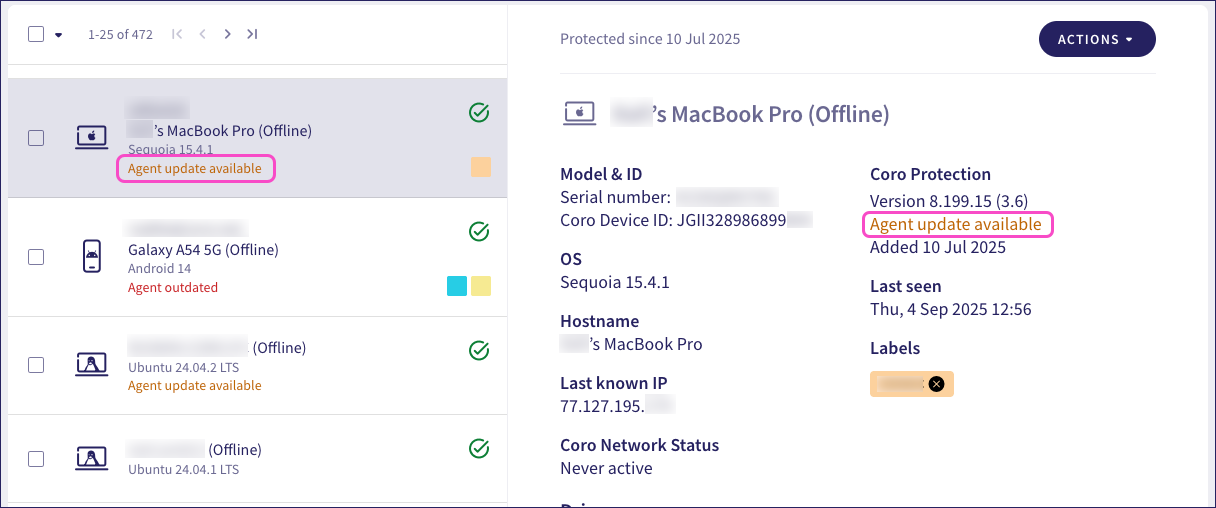
Coro shows a status message against each device when an update becomes available.
If a new Agent version is available, Coro shows one of the following statuses:
| Status | Meaning | Action required |
|---|---|---|
| Agent update available | Coro released a new Agent version to Release Candidate or Gradual Rollout stage. | No immediate action is required, but the device can be updated if needed. |
| Agent update pending | Coro released a new Agent version to Release Candidate, Gradual Rollout, or General Availability stage. | The device is enrolled in automatic updates and awaiting rollout of the new version. |
Agent outdated | Coro released a new Agent version to General Availability stage. | The device requires updating at the earliest opportunity. Important If the device is enrolled in automatic updates, it should already have been updated and now requires attention. |
Use the Linux Agent installation procedure to upgrade an existing Linux Agent to the latest version.
The macOS version of the Coro Agent supports automatic silent updates.
To enable the Agent to silently auto-update to the newest stable version, include your macOS device in the Allow self-update to the latest stable version device setting. For more information, see Device protection settings.
Devices can be updated through the following mechanisms:
End users receive auto-update notifications when relevant. The Coro Agent is downloaded and installed automatically.
The Coro Agent can be manually upgraded in-place on each endpoint device. To learn more, see Deploying the Agent on macOS.
For deployment through RMM, see the Featured Guides > Deploy Coro Agent across endpoints section of this site for articles covering recommended tools, or contact Coro Support for help.
The process for upgrading the Coro Agent depends on the version currently installed on your Windows device.
From version 1.9, the Coro Agent supports automatic silent updates. Versions prior to 1.9 must be updated manually.
| Agent version | Build | Summary |
|---|---|---|
| 1.9 | 2.0.36.1 | The Coro Agent is auto-updated silently, through Remote Monitoring and Management (RMM) tools, or manually. |
| 1.8 | 2.0.33.1 | The Coro Agent must be manually updated in-place, or through RMM tools. |
| 1.7 | 2.0.32.1 | The Coro Agent must be manually updated in-place, or through RMM tools. |
| 1.7 | 2.0.30.1 | The Coro Agent must be manually updated in-place, or through RMM tools. If the Agent was installed after May 2023 assistance from our support team might be needed to enable Allow Agent uninstallation. |
| 1.5 | 2.0.27.1 | The Coro Agent must be manually updated in-place, or through RMM tools. If the Agent was installed after May 2023 assistance from our support team might be needed to enable Allow Agent uninstallation. |
| 1.4.4 | 2.0.26.1 | The Coro Agent must be uninstalled manually before the new version can be installed. |
For deployment through RMM, see the Featured Guides > Deploy Coro Agent across endpoints section of this site for articles covering recommended tools, or contact Coro Support for help.
Devices running this build number can be updated through the following mechanisms:
End users receive auto-update notifications when relevant. The Coro Agent is downloaded and installed automatically, with the user prompted to restart their device to enable the new version.
ImportantTo enable the Agent to silently auto-update to the newest stable version, include your Windows device in the Allow self-update to the latest stable version device setting. For more information, see Device protection settings.
Mass deployment through an RMM tool. Admin users with sufficient permissions should first enable Allow Agent uninstallation from the workspace prior to downloading the latest version and configuring the RMM tool for upgrading.
The Coro Agent can be manually upgraded in-place on each endpoint device. To learn more, see Deploying the Agent on Windows.
Devices running these build numbers can be updated through the following mechanisms:
- Mass deployment through an RMM tool. Admin users should first enable Allow Agent uninstallation from the workspace prior to downloading the latest version and configuring the RMM tool for upgrading.
- The Coro Agent can be manually upgraded in-place on each endpoint device. To learn more, see Deploying the Agent on Windows.
If the Agent was installed after May 2023 assistance from Coro Support might be needed to enable Allow Agent uninstallation.
Devices running build 2.0.26.1 must have the Agent software removed manually before the new version can be installed. You can achieve this through the standard Windows Add or remove programs feature, or by seeking assistance from Coro Support.
After the software has been successfully removed, install the new Agent version as described in Deploying the Agent on Windows.