Gatekeeper is a security feature that protects users from downloading and running malicious or unauthorized software on macOS devices. Advanced users and developers may need to temporarily disable Gatekeeper to install and run applications that are not signed or notarized by Apple.
To create a new Gatekeeper Disabled policy:
From Device Posture, select + ADD:

Select Add to macOS.
Coro displays the Add new device policy to macOS dialog.
The Gatekeeper Disabled device policy is currently supported for macOS devices.
Select Gatekeeper Disabled from the Select policy type dropdown:
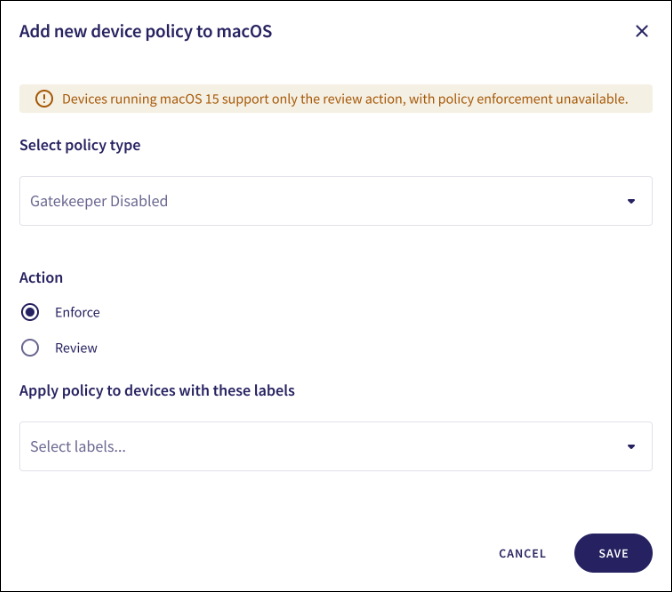
Select the policy Action:
- Review: Coro does not perform auto-remediation. It creates a review ticket that remains open for 10 days before closing automatically. During this time, Coro adds any newly detected affected devices to the ticket. Admin users can close the ticket manually at any time.
- Enforce: Coro performs auto-remediation, records the action in a ticket, and closes the ticket automatically.
If the policy violation reoccurs after a ticket is closed, Coro automatically creates a new ticket.
ImportantDevices running macOS 15 and later support the Review action. The Enforce action is not available.
Enter label names (predefined or custom) to the Labels field listed under Apply policy to devices with these labels to apply the new policy to specific groups of devices:

Select SAVE.
Coro creates the policy with the configured settings.
When Gatekeeper is disabled on a macOS device, a Gatekeeper disabled ticket type is created.
Select the dropdown next to Gatekeeper Disabled on the Device Posture tab to view the policy. See Device posture configuration overview.
Coro displays the following policy details:
Device labels applicable to the policy.
The actions applicable to the policy, such as Enforce.
