This feature requires:
- Endpoint devices running Coro Agent v3.8.7.
- An active workspace subscription to the Endpoint Security and EDR modules.
Coro can monitor specified files for changes based on the baseline measured SHA-256 hash value at the first observed event, and alert admin users via a File Integrity Violation ticket when, at subsequent checks, the hash value no longer matches.
If a file change is planned or expected, Admin users can reset the baseline hash value through the raised violation ticket. Admin users can also instruct Coro to ignore further violations for the monitored file in the same way.
In this release, the only available policy action is Review. Coro will monitor files and raise tickets for violations only.
To create a new Monitor File Integrity policy:
From Device Policy, select + ADD POLICY:

Coro displays the Add policy dialog:
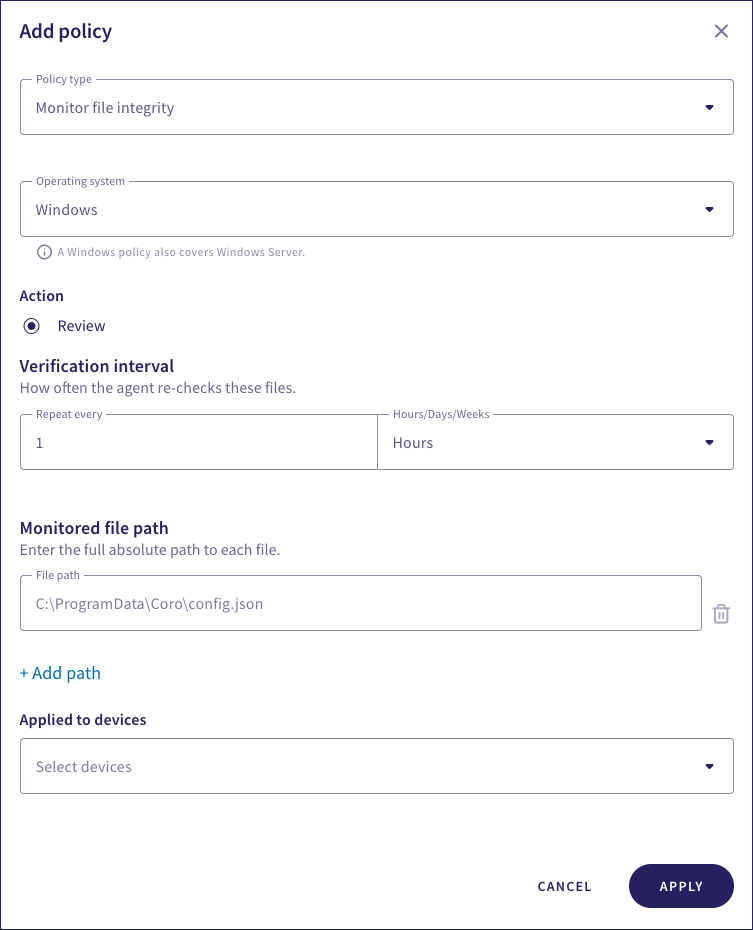
Select Monitor file integrity from the Policy type dropdown.
Select the device Operating system for this policy:
- Windows
- macOS
Select a Verification interval:

Select the number of hours, days, or weeks at which Coro should recheck the integrity of the monitored files under this policy.
Enter the full absolute path on target devices of the file to be monitored under this policy:
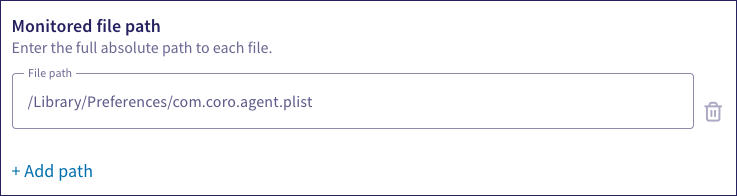
Select + Add path to enter an additional file path, up to a maximum of five. Use the bin icon to remove a file.
Enter label names (predefined or custom) to the Labels field listed under Applied to devices to apply the new policy to specific groups of devices.

Select APPLY.
Coro creates the policy with the configured settings. File monitoring begins and a hash for each named file is calculated and recorded as the starting baseline.